What happens when you stop treating AI as a shortcut and start treating it as a senior engineer on your team?
There’s a moment every iOS developer quietly dreads.
You open a file you wrote two years ago. A UIViewController. It's 800 lines long. Delegates calling delegates. Completion handlers are nested three levels deep. Business logic quietly lives in places it absolutely should not be.
The app works. But you know — the way every engineer eventually knows — that every new feature added to this foundation costs a little more than the last one.
That was us. And instead of patching around it, we made a call: full migration to SwiftUI. And we were going to use Claude Code AI to do it without losing our minds.
This is that story — written for developers who want to know how, and for product teams who want to know why it matters for their business.
Is UIKit Dead in 2026? Should You Still Use It?
Short answer: No, UIKit is not dead. Apple still supports it actively, and millions of production apps run on it beautifully.
But UIKit was designed in a different era — one where you manually wired every label, managed every thread, and told the framework each step of what to do, in what order. SwiftUI changes the entire conversation. You describe what the UI should look like for a given state, and the framework figures out the rest.
For developers, that means fewer state-sync bugs, less boilerplate, and faster shipping. For clients and product owners, that means a codebase that scales — where the next feature is cheaper to build than the last one, not more expensive.
The real question isn’t whether SwiftUI is better. It’s whether your team can migrate without breaking everything in the process. That’s where most teams get stuck.
Why Is the UIKit-to-SwiftUI Migration So Hard?
Migration isn’t a weekend project. It reaches into:
- Your networking layer and async patterns
- Your navigation architecture
- Your dependency injection setup
- Every screen you’ve ever shipped
Done carelessly, it can halt a team for months while shipping slows to a crawl. Done smartly — incrementally, with AI assistance — it becomes a background process your users never even notice.
What Is Claude Code and How Does It Help iOS Developers?
Claude Code is an AI coding tool built by Anthropic. Unlike basic code completion tools, it understands full files, reasons about architecture, and can hold a conversation about engineering trade-offs.
For migration work specifically, it acts less like autocomplete and more like a senior engineer who:
- Can read a legacy file and immediately explain what it does
- Knows your architecture conventions and applies them consistently
- Helps you think through the tricky structural decisions
- Flags problems before they become production bugs
The most valuable thing it gave us wasn’t generated code — it was accelerated thinking. Every architectural fork that might have taken a long team discussion was resolved faster because Claude Code helped us map the trade-offs clearly.
What Is the Best Strategy for the UIKit-to-SwiftUI Migration?
The worst migration advice is “rewrite everything.” Teams that do this end up with two half-finished codebases and a release calendar in ruins.
The approach that actually works is the strangler fig pattern — let the new system grow quietly around the old one, replacing it piece by piece until the original is gone.
Our phased plan:
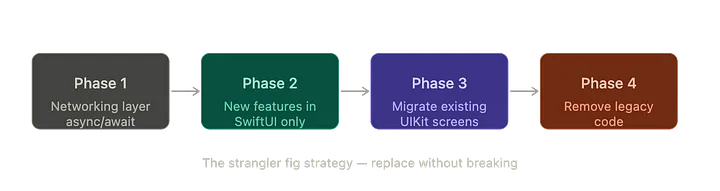
Phase 1 — Networking layer first It’s invisible to users and the highest-leverage starting point. Modernise async patterns here before touching a single view.
Phase 2 — New features in SwiftUI only Every new screen, no exceptions. Stop adding to the old system while the new one grows.
Phase 3 — Migrate existing screens one by one Start with the least complex. Let the old ones retire gracefully.
Phase 4 — Remove legacy code Clean up the bridges, wrappers, and remnants once everything is migrated.
The key: users never noticed a thing. SwiftUI screens lived temporarily inside UIKit navigation wrappers. Old flows stayed intact while new ones were built beside them.
How Did Claude Code Help Us Understand a Legacy Codebase Faster?
Before you can replace something, you have to understand it. In a mature UIKit project, that means untangling years of accumulated patterns — delegate chains, callback closures, and business logic that quietly drifted into view controllers over time.
This archaeology phase is the hidden tax of every migration. Slow, tedious, and it delays everything else.
Claude Code cut through it remarkably fast. Hand it a legacy manager class, and it immediately surfaces what the component actually does, where responsibilities are blurred, and what a clean path forward looks like.
What used to take a senior developer an afternoon now takes minutes. Multiplied across an entire codebase — that’s weeks of recovered time redirected into actual shipping.
How Do You Keep Architecture Consistent During a Long Migration?
Every team has architecture rules. MVVM. Repository pattern. Clean separation between data, logic, and UI. The rules exist for a reason — and they’re easy to forget under deadline pressure.
Our solution: a CLAUDE.md file at the project root documenting every architecture convention. Claude Code, read this before touching anything. Every ViewModel that was scaffolded followed the same structure. Every view stayed out of business logic. Every state transition was explicit.
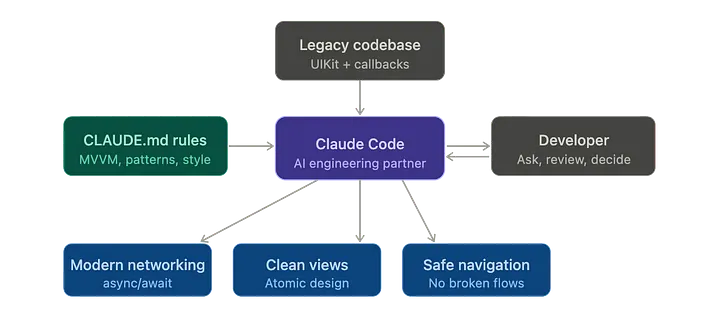
The result was architecture that enforced itself — not because someone was policing every PR, but because the conventions were always in context, shaping every output.
For any team managing a growing codebase, consistency doesn’t require policing when it’s baked into the workflow.
UIKit vs SwiftUI: What Actually Changes?
One of the biggest migration wins was modernising the networking layer. Here’s the honest before-and-after:
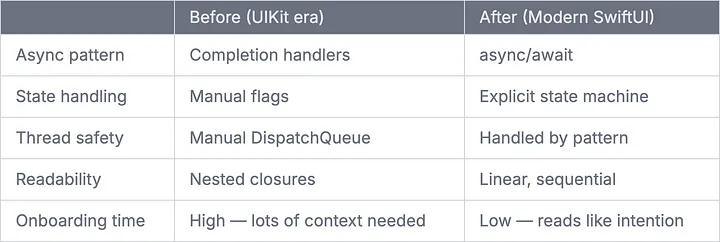
Not just cleaner syntax — architecturally more honest. Any developer on the team can follow the story from request to response without decoding a callback pyramid first.
How Do You Avoid Monolithic Views in SwiftUI?
One of SwiftUI’s quiet traps is the ever-growing view file. A simple card component becomes a 400-line monster with embedded logic and conditional layouts that only the original author understands.
We avoided this with Atomic Design from day one — every component has a clear level of responsibility:
- Atoms — smallest reusable primitives: buttons, labels, avatar images
- Molecules — small compositions: a booking card, a user profile row
- Organisms — larger sections: a full list view, a filter toolbar
- Templates — page-level layout shells with no hardcoded content
Claude Code understood this hierarchy before writing a single view. Every component started from the right level. The result: a component library that composes cleanly across the entire app.
For clients, this directly lowers the cost of every future design iteration. When your UI is built from composable primitives, changing something once updates it everywhere.
How Do You Handle Navigation During a SwiftUI Migration?
Navigation is where migrations get genuinely tricky. UIKit’s push/pop model has deeply held assumptions that don’t map neatly to SwiftUI’s NavigationStack — especially with deep links, modal flows, and coordinator patterns in play.
The strategy we worked through with Claude Code: keep the existing coordinator architecture intact throughout the transition. New SwiftUI screens were embedded inside the UIKit navigation hierarchy temporarily via hosting controllers. As full flows got migrated, the wrappers came off one by one.
No moment of instability. No half-migrated flows reaching users. Just a slow, controlled handoff — completely invisible from the outside.
What Are the Biggest Mistakes to Avoid in a SwiftUI Migration?
Every migration teaches lessons no tutorial covers. Here are the ones that actually cost us time:
Treating bridges as permanent. Compatibility wrappers that let UIKit and SwiftUI coexist are powerful — but they’re borrowed time, not a destination. Give every bridge a migration timeline the day you create it.
Ignoring thread safety. SwiftUI makes many things easier, but not threading. Updating UI state from a background context produces subtle, maddening glitches. This needs explicit handling every time, everywhere.
Trusting Combine subscriptions to stay alive. A subscription that gets deallocated doesn’t throw an error. It just stops — silently — mid-flight. This is the kind of bug that takes an embarrassingly long time to diagnose the first time.
Using AI like a code generator. The biggest wins didn’t come from asking Claude Code to write boilerplate. They came from conversations: “What’s structurally wrong with this ViewModel?” or “How should I approach pagination here?” The reasoning partnership is where the real acceleration happens.
Does AI-Assisted Development Actually Improve Code Quality?
This is a fair question, and the answer is: it depends entirely on how you use it.
AI used as a code generator produces average code at average speed. AI used as a thinking partner — one that knows your conventions, understands your context, and helps you reason through decisions — produces better engineering outcomes than either the developer or the AI could reach alone.
The proof is in the outcome. After our migration:
- Every new feature ships in SwiftUI — no discussion needed
- The networking layer is fully modernised, with zero legacy patterns in any new file
- View code is shorter, more testable, and faster to review
- New developers reach full productivity faster because the codebase reads like intention, not implementation history
- The app never broke. Users never noticed anything change.
The best migration is the one nobody notices. That’s what we delivered.
When Should You Start a UIKit to SwiftUI Migration?
The honest answer: when the cost of staying on UIKit starts exceeding the cost of moving.
Some signals it’s time:
- New features take noticeably longer to build than they used to
- Onboarding new iOS developers takes weeks instead of days
- Your testing coverage is low because testing UIKit code is painful
- You keep adding to screens that already feel brittle
Start with the networking layer. It’s invisible to users, high-leverage, and a clean proving ground for new patterns. Build the next feature in SwiftUI. Then the one after that. Let the old code fade out rather than forcing it out.
After a focused, phased migration, here’s where we landed:
Every new feature now ships in SwiftUI — no discussion, no exception. The networking layer is fully modernised with zero callback-based patterns surviving in any new file. View code is shorter, more testable, and faster to review in every PR. New developers reach full productivity in days rather than weeks because the codebase reads like intention, not archaeology.
The app never broke. Shipping never stopped. Users never noticed a thing.
That’s the standard we held ourselves to — and it’s the standard every migration should aim for.
Final Thought: The Future of iOS Development Is Collaborative
We didn’t just migrate an app. We changed how our team works.
When AI is treated as a senior collaborator — one that knows your conventions, reads your legacy code, and thinks through architectural decisions with you — the ceiling on what a small team can deliver rises significantly. Not because AI replaces the engineer’s judgment, but because it frees the engineer to spend more of their time on the decisions that actually matter.
The iOS developers who thrive in the next few years won’t be the ones who resist AI tooling. They’ll be the ones who learn to work with it — directing it, questioning it, and using it to amplify their own expertise.
That’s the shift we made. And it’s one we’d make again.
If this helped you, feel free to share it with someone on your team who’s considering a similar migration.
Related Topics
Enjoyed this article?
Check out more blogs on our blog.