


Introduction
Supabase is a tool that helps developers build the backend part of their websites or apps quickly and easily. It’s called a Backend-as-a-Service (BaaS). This means it provides ready-made tools and services so you don’t have to build everything from scratch.
What makes Supabase special is that it is open-source, meaning it’s free to use and you can view or even modify the source code if needed. It is often compared to Firebase, a similar tool by Google. However, while Firebase uses a NoSQL database, Supabase uses PostgreSQL, a powerful and popular SQL database.
Because Supabase is PostgreSQL-based, you can write standard SQL queries, which is easier to understand if you’re already familiar with relational databases.
How Supabase Works
Supabase is like a toolbox that gives you all the parts you need to build your website or app.
1. PostgreSQL Database — The place where data lives
This is where Supabase stores all your data. For example, in a hotel booking app, it can store:
- User details (name, email, etc.)
- Room information
- Booking records
Supabase uses PostgreSQL, which supports SQL for managing data using CRUD operations (Create, Read, Update, Delete).
2. Auto-generated APIs — Connect your frontend easily
As soon as you create a table in the database, Supabase automatically generates:
- REST APIs
- GraphQL APIs
You can instantly use these APIs to:
- Add new data
- Fetch data
- Update data
- Delete data
3. Authentication — User login and signup system
Supabase provides a built-in authentication system.
Features include:
- Email & password authentication
- OAuth providers like Google, GitHub, Facebook, etc.
- Session management
- Password handling
- Email verification
4. Storage — Upload and manage files
You can upload and manage files such as:
- Images
- PDFs
- Videos
- Other documents
Files are stored securely, and access rules can be defined to control who can upload or view them.
5. Edge Functions — Custom backend code (serverless)
Sometimes you need custom server-side logic, such as sending a welcome email after signup.
Supabase provides Edge Functions, which are serverless functions that run automatically when triggered. You don’t need to manage any servers.
Backend Features: What Supabase Can Do for You
1. CRUD Operations
Supabase supports full CRUD functionality:
- Create new data
- Read existing data
- Update records
- Delete records
You can perform these using SQL or the generated APIs.
2. Row-Level Security (RLS)
RLS allows you to control who can access specific rows in your database.
Example: If user-1 creates a booking, RLS ensures that only user-1 can view or modify that booking.
3. Realtime Updates (WebSockets)
Supabase supports real-time subscriptions.
This means your app can update instantly when data changes—without refreshing the page.
Useful for:
- Chat apps
- Live dashboards
- Realtime notifications
4. Scalable Storage Buckets
Files can be grouped into buckets, which scale as your app grows.
Examples:
- Profile images bucket
- Invoices bucket
- Hotel room photos bucket
5. OAuth Support
Users can log in using platforms like:
- GitHub
This improves user experience and reduces signup friction.
Merits of Supabase
Open Source
Supabase is completely open source. You can:
- View the source code
- Modify it
- Self-host it
It also has a strong and growing developer community.
PostgreSQL-Based
Supabase is built on PostgreSQL, which supports:
- Complex queries
- Relationships
- Transactions
- Indexing
This makes it reliable and scalable for real-world applications.
Realtime Capabilities
Supabase uses WebSockets to provide real-time updates.
Example: In a hotel booking app, new bookings appear instantly on the dashboard.
Easy Integration
Supabase provides SDKs for:
- JavaScript
- Python
- Dart
- And more
This makes integration with web and mobile apps very simple.
Authentication
Supabase includes:
- Login & signup
- Password reset
- OAuth providers
- Role-Based Access Control (RBAC)
File Storage
Supabase offers S3-compatible object storage with:
- Buckets
- Access rules
- Secure file handling
Perfect for images, videos, invoices, and documents.
Edge Functions
Edge Functions let you:
- Send emails
- Perform calculations
- Call third-party APIs
All without managing servers.
Demerits of Supabase
Still Growing
Supabase is newer than platforms like Firebase or AWS. Some advanced features may be missing for very large or complex applications.
Limited Analytics
Supabase does not include built-in analytics dashboards. You’ll need third-party tools like Google Analytics.
Function Complexity
Edge Functions are limited compared to full backend frameworks like:
- Node.js
- Django
For complex or long-running tasks, an external backend may be needed.
Pricing Tiers
While the free tier is generous, larger apps may need paid plans due to:
- Database size limits
- API request limits
- Storage limits
Use Cases of Supabase
1. SaaS Applications
Build full-featured SaaS platforms with authentication, storage, and real-time updates.
Example: A student project management app with real-time collaboration.
2. Mobile Apps
Works well with:
- Flutter
- React Native
Example: A fitness tracking app with live stats.
3. Admin Dashboards
Build internal tools to manage data and users.
Example: Hotel management dashboard for bookings and staff.
4. E-commerce Websites
Use Supabase for:
- Product management
- Orders
- User authentication
Example: An online clothing store.
5. Real-Time Collaboration Tools
Ideal for live interaction apps.
Example: Team chat apps or shared whiteboards.
6. Prototypes & MVPs
Supabase is perfect for fast MVP development.
Example: A food delivery app demo built quickly without backend boilerplate.
Difference Between Normal Backend Framework and Supabase

Example: User Authentication & Profile Creation in Supabase (Python)
Install Dependency
pip install supabasemain.py
from supabase import create_client
from config import SUPABASE_URL, SUPABASE_KEY

supabase = create_client(SUPABASE_URL, SUPABASE_KEY)

def sign_up_user(email: str, password: str):
    try:
        result = supabase.auth.sign_up({"email": email, "password": password})
        user = result.user
        if user:
            print("User registered:", user.email)
            return user
        else:
            print("Sign-up requires email confirmation.")
            return None
    except Exception as e:
        print("Error during signup:", e)
        return None

def sign_in_user(email: str, password: str):
    try:
        result = supabase.auth.sign_in_with_password({"email": email, "password": password})
        session = result.session
        if session:
            print("User logged in. Access token:", session.access_token)
            return result.user
        else:
            print("Login failed: No session returned.")
            return None
    except Exception as e:
        print("Login failed:", e)
        return None

def store_user_profile(user_id: str, name: str):
    try:
        response = supabase.table("profiles").insert({"id": user_id, "name": name}).execute()
        if response.data:
            print("Profile created:", response.data)
        else:
            print("Profile insert failed:", response)
    except Exception as e:
        print("Error inserting profile:", e)

if __name__ == "__main__":
    email = "user123@gmail.com"
    password = "Password@123"
    name = "Test User"

    user = sign_up_user(email, password)

    if user:
        print("Check your email to confirm registration...")
        signed_in_user = sign_in_user(email, password)
        if signed_in_user:
            store_user_profile(signed_in_user.id, name)
.env
SUPABASE_URL=https://xyz.supabase.co
SUPABASE_KEY=eyJhbGciOiJIUzI1NiIsInR5cCI6IkpXVCJ9.xyz
config.py
import os
from dotenv import load_dotenv

load_dotenv()

SUPABASE_URL = os.getenv("SUPABASE_URL")
SUPABASE_KEY = os.getenv("SUPABASE_KEY")

if not SUPABASE_URL or not SUPABASE_KEY:
    raise ValueError("SUPABASE_URL or SUPABASE_KEY is missing in .env file.")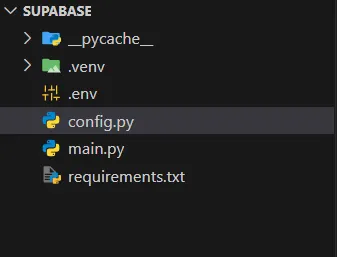
Output
User registered: user123@gmail.com
Check your email to confirm registration...
User logged in. Access token: eyJhbGciOiJIUzI1NiIsImxyz...
Profile created: [{'id': 'dd538735-0163-4c22-bc50-c8c49d5e4b17', 'name': 'Test User', 'created_at': '2025-05-29T07:34:14.74143+00:00'}]
Conclusion
Supabase is an open-source Backend-as-a-Service that simplifies app development by providing real-time databases, authentication, storage, and APIs built on PostgreSQL. It’s a scalable, developer-friendly alternative to Firebase that offers flexibility and control.
Supabase is enough for most applications, especially those involving standard CRUD operations, authentication, and real-time features.
However, if your application requires complex backend logic, large-scale job queues, or custom infrastructure, a traditional backend framework may be a better choice.
References
-
Supabase Docs — Supabase is an open-source Firebase alternative providing all backend features you need https://supabase.com
-
Supabase Python API Reference https://supabase.com/docs/reference/python
Related Topics
Enjoyed this article?
Check out more blogs on our blog.