The Problem — A Common Developer Struggle
You’ve probably heard (or even said), “It runs on my PC. But why doesn’t it run on yours?”
As Python developers, we often install various dependencies, sometimes with specific versions, directly into the global environment. This setup usually works fine for one project — until it starts causing issues.
Now, imagine you’re juggling two projects on alternate days. Both rely on the same libraries but require different versions. Suddenly, you’re dealing with version conflicts that lead to confusing errors or broken features.
Every Python developer has faced this pain: messy environments, tangled dependencies, and packaging that feels anything but smooth.
So, what if managing a Python project could be simple, clean, and even a little poetic?
Solutions — Finding a Way Out
Luckily, like most problems in tech, this one has solutions too. Let’s break them down:
1. Use Virtual Environments
Create an isolated environment for each project. This ensures every project has its own set of dependencies, without interfering with others.
2. Save Your Dependencies
Track your project’s required packages and their specific versions. This makes your setup reproducible and consistent across machines.
3. Use a Dependency Manager
Let smart tools handle your environments and dependencies for you. This brings us to the main focus of this blog — Poetry, a modern Python dependency manager that simplifies all of this.
What is Poetry?
Poetry is a modern tool for managing dependencies and packaging in Python projects. It simplifies the process of setting up, maintaining, and sharing your code.
With Poetry, you can:
- Manage all the libraries your project depends on
- Automatically create isolated virtual environments
- Build and publish your own Python packages
- Keep everything neat and centralized in a single file:
pyproject.toml
In simple terms, Poetry is like a project manager for your code, keeping everything clean, consistent, and ready for development, production, or distribution.
Getting Started with Poetry
Step 1: Installation
Install Poetry using pipx (recommended, as it keeps it isolated from your global environment):
pipx install poetry
pipx ensures Poetry is installed in an isolated environment, keeping your global Python clean.
Step 2: Create a New Project
Create a new Poetry project and navigate into it:
poetry new <project-name>
cd <project-name>
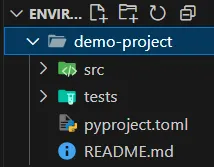
This generates a basic project structure and includes a pyproject.toml file — your central config file. It declares project setup, metadata, and dependencies.
[project]
name = "demo-project"
version = "0.1.0"
description = ""
authors = [
    {name = "xyz", email = "abc@gmail.com"}
]
readme = "README.md"
requires-python = ">=3.13"
dependencies = []

[tool.poetry]
packages = [{include = "demo_project", from = "src"}]

[build-system]
requires = ["poetry-core>=2.0.0,<3.0.0"]
build-backend = "poetry.core.masonry.api"
At this stage, the dependencies section is empty.
Step 3: Create and Activate Virtual Environment
To automatically set up a virtual environment and install dependencies:
poetry install
To activate the virtual environment:
poetry shell
If the shell doesn’t start, you might need to install the shell plugin:
pipx inject poetry poetry-plugin-shell
Step 4: Manage Dependencies
Add a package (e.g., NumPy):
poetry add numpy
This updates pyproject.toml:
dependencies = [
    "numpy (>=2.2.5,<3.0.0)"
]
Remove a package:
poetry remove numpy
Show all added dependencies:
poetry show
Check where your virtual environment is located:
poetry env info
Difference Between pyproject.toml and poetry.lock
pyproject.toml
The Project Blueprint — This is your main configuration file.
Purpose:
- It defines your project metadata, dependencies, and build settings.
- You edit this directly when adding or removing dependencies, changing the project name, version, etc.
[project]
name = "my-awesome-project"
version = "0.1.0"
dependencies = [
    "requests"
]
Analogy:
Think of it like your shopping list — what packages you want.
poetry.lock
The Exact State — This is your lock file, auto-generated by Poetry.
Purpose:
- It records the exact versions of all dependencies (and sub-dependencies) that were installed.
- You never edit this manually; Poetry manages it for you.
- Ensures reproducibility — the same versions will be installed every time on any machine that runs
poetry install.
Analogy:
If pyproject.toml is your shopping list, then poetry.lock is your receipt — exactly what you bought.
Why Use Poetry?
So, why should you choose Poetry over traditional tools like pip, virtualenv, or requirements.txt? Here’s what makes it stand out:
-
Clean Manage everything from dependencies to project metadata in a single, structured file:
pyproject.toml. -
Isolated Automatically handles virtual environments for each project, keeping dependencies separate and conflicts to a minimum.
-
Complete Handles the full lifecycle of a project — from development and dependency management to building and publishing packages.
-
Trusted Loved and used by many in the modern Python community, including open-source maintainers and professional developers.
Advantages
All-in-One Tool
Poetry handles dependency management, virtual environments, and packaging — no need to juggle pip, virtualenv, and setuptools.
Easy Dependency Management
Install a package with a simple command:
poetry add package-name
No need to manually update a requirements.txt file.
Automatic Virtual Environments
Poetry creates and manages a separate virtual environment for each project, keeping everything isolated by default.
Version Locking
Poetry generates a poetry.lock file to ensure consistent package versions across all machines.
Smart Dependency Resolution
Before installing, Poetry tries to resolve compatible versions, helping you avoid conflicts early in the development process.
Disadvantages
Learning Curve
If you’re used to pip and venv, the Poetry workflow might feel unfamiliar at first.
Performance
On larger projects, dependency resolution and installation can be slower compared to traditional tools.
Not the Official Standard (Yet)
While widely adopted in the Python community, Poetry is not the official default. Some teams or companies may still prefer the classic pip + venv combo.
Conclusion
Poetry brings modern elegance to Python project management. It simplifies everything from dependency handling and virtual environments to building and publishing your code.
With its pyproject.toml structure and automatic environment isolation, it helps you write clean, maintainable, and reproducible Python projects.
Related Topics
Enjoyed this article?
Check out more blogs on our blog.