


Why Automation and AI Matter at Work
Let’s face it: repetitive tasks like copying data, sending reminders, or organizing files can make work feel like a never-ending loop. These small, routine jobs may be necessary, but they drain time, energy, and creativity.
That’s where automation and AI come in. By handling the boring, repetitive stuff, these tools free you to focus on what actually matters — solving problems, being creative, and moving faster.
Whether it’s AI summarizing a message or a workflow that updates your CRM and sends follow-ups automatically, automation helps you work smarter, not just harder.
In this blog, we’ll compare Relay AI and n8n, two powerful tools that bring automation and AI into your daily work in very different ways.
What is Relay AI?
Relay AI (also known as Relay.app) is a modern workflow automation tool designed to simplify and speed up how teams work together. It helps you automate repetitive tasks using both simple logic and AI, without needing to write any code.
What makes Relay stand out is its focus on collaboration and AI-powered steps. It’s built for teams who want automation to be part of their everyday workflow, not just something running in the background. Think of it like a smarter version of Zapier, with built-in AI features and a focus on clarity and teamwork.
Key things Relay AI can do
- Automate repetitive tasks across tools like Gmail, Notion, Slack, Google Sheets, and more
- Use AI (like GPT-4) to summarize emails, draft replies, extract data, or make decisions
- Create workflows with human-in-the-loop steps, like approvals or reviews
- Collaborate as a team, with clear visibility into what’s automated and what needs input
- Trigger actions based on events, like a new email, form submission, or status update
What is n8n?
n8n (short for “node to node”) is a powerful, open-source automation tool that lets you build complex workflows by connecting different apps, services, and custom logic — all without being locked into a single platform.
Unlike many “no-code” automation tools, n8n is low-code, meaning it gives you the flexibility to write custom functions, add JavaScript logic, and work with APIs when needed. It’s ideal for developers, technical users, or teams who want complete control over their workflows and data.
Get Rumit Gevariya’s stories in your inbox Join Medium for free to get updates from this writer.
Enter your email Subscribe
n8n can be used self-hosted (on your own server or cloud) or via n8n.cloud, their managed SaaS offering.
Key things n8n can do
- Connect to hundreds of apps (Slack, Google Sheets, Airtable, CRMs, etc.)
- Trigger workflows from events like new form entries, API calls, webhooks, or schedules
- Add custom code, logic branches, or expressions at any step
- Use AI services like OpenAI or Hugging Face to summarize, generate, or classify text
- Handle large, complex workflows that include data transformation, looping, and error handling
Relay AI vs n8n: What’s the Difference?
1. Ease of Use
Relay AI: Designed for non-technical users. It has a clean, no-code interface that makes it easy to build and understand workflows, especially for teams.
n8n: Geared toward technical users. It offers more power and flexibility but has a steeper learning curve. Ideal if you’re comfortable with logic, variables, or code.
2. Hosting and Control
Relay AI: Fully cloud-based. You use it via their platform, with no need to manage infrastructure.
n8n: Can be self-hosted or used via their cloud service. Self-hosting gives you full control over your data and setup.
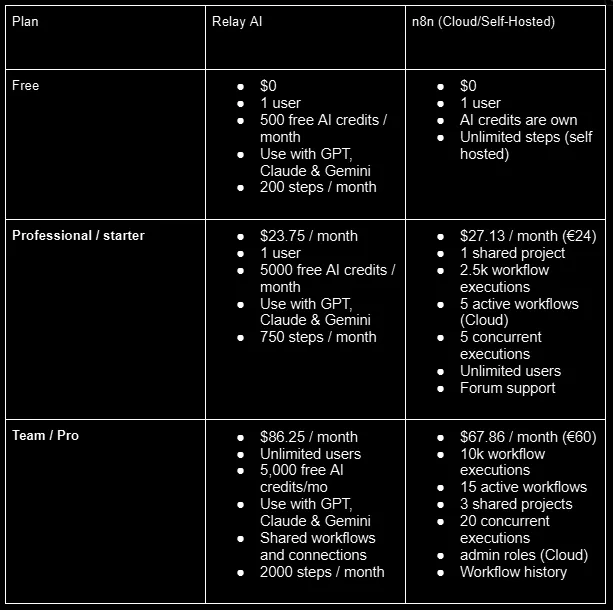
3. Pricing Comparison
4. AI Integration
Relay AI: Built-in AI features (like GPT summarization, drafting, classification) are native to the platform — no setup needed.
n8n: You bring your own AI tools. It integrates with OpenAI, Hugging Face, or any API, but you configure and manage the connection.
5. Customization and Logic
Relay AI: Focuses on simplicity and guided automation. Great for standard business processes, but not highly customizable.
n8n: Extremely customizable. You can write JavaScript code, handle complex logic, create custom nodes, and more.
6. Collaboration
Relay AI: Built for teams. It includes features like shared workflows, human-in-the-loop approvals, and team visibility.
n8n: More focused on individual or developer-led workflows. Collaboration is possible but not the primary design.
7. Best For
Relay AI: Business teams, operations, support, and marketing folks who want fast, clean automations with smart AI help.
n8n: Developers, data engineers, and tech-savvy users who need deep flexibility and control.
When to Use Which?
Choosing between Relay AI and n8n really comes down to your team’s needs, technical comfort level, and how deeply you want to customize your workflows. Here’s a simple guide to help you decide.
Use Relay AI if
- You want to automate tasks quickly without writing code
- Your workflows involve team collaboration, approvals, or shared visibility
- You prefer a clean, user-friendly interface that simplifies automation
- You want built-in AI features like summarization, classification, and content generation without setup
- You’re part of a business, operations, support, or marketing team looking to save time
Example: Automating a support process where AI summarizes customer emails, routes them to the right person, and generates a draft response for approval.
Use n8n if
- You need full control and flexibility over your workflows
- You’re comfortable with logic, APIs, or writing a bit of code
- You want to self-host your automation platform for privacy or security reasons
- You need to integrate with multiple tools, services, or custom APIs
- You’re building more advanced, technical automations
Example: Creating a lead scoring system using OpenAI + custom JavaScript that integrates with your internal CRM, Slack, and database.
Still Not Sure? 🧐
- Try Relay AI if you’re getting started with automation and want fast, smart results with no code.
- Try n8n if you’ve outgrown tools like Zapier or Make and need something more powerful and flexible.
Conclusion
Automation and AI are transforming the way we work, freeing us from repetitive tasks and giving us more time to focus on what truly matters. Both Relay AI and n8n bring powerful solutions to the table — but they serve different needs.
If you’re looking for a user-friendly, team-focused platform with built-in AI capabilities that helps you automate fast and collaborate easily, Relay AI is an excellent choice. It’s perfect for business teams who want to get started without a steep learning curve.
On the other hand, if you need flexibility, deep customization, and full control — especially if you’re comfortable with coding or want to self-host your workflows — n8n offers unmatched power and extensibility.
Ultimately, your choice depends on your team’s technical skills, collaboration needs, and the complexity of your workflows. Both tools can help you work smarter and unlock new productivity through automation and AI.
References
-
Introduction | Relay.app Docs If you're new to Relay.app, here are some videos to help you get started. How to Set Up an Automated Step Every… docs.relay.app
-
Explore n8n Docs: Your Resource for Workflow Automation and Integrations | n8n Docs Access n8n Docs for comprehensive guides on workflow automation and integrations. Learn how to integrate apps and… docs.n8n.io
Related Topics
Enjoyed this article?
Check out more blogs on our blog.