Introduction
uv is a new tool that helps you install Python libraries really fast. It does the same job as pip, but much quicker and more efficiently. With uv, you can create virtual environments, install packages, and manage your project — all in one place. It’s great for beginners because it’s easy to use and saves a lot of time! It is an extremely fast Python package and project manager, written in Rust.
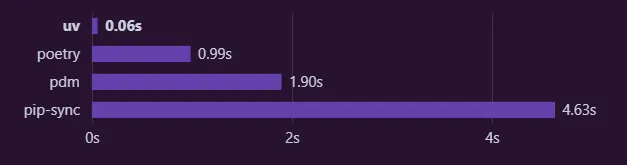
Source: https://docs.astral.sh/uv/ ( uv official docs )
Description
Installing Trio‘s dependencies with a warm cache.
SetUp Guide
First, for installing uv you have 2 methods:
Astral’s (uv’s creators) official standalone installer
For Windows, you can run the below command in your PowerShell:
powershell -ExecutionPolicy ByPass -c "irm https://astral.sh/uv/install.ps1 | iex"
For macOS or Linux, you can run this command mentioned below:
curl -LsSf https://astral.sh/uv/install.sh | sh
By using other installers
PyPI: If installing uv using PyPI it is recommended that you install it in an isolated environment by using pipx. You can also use pip.
pipx install uv
pip install uv
uv is also available on different platforms like Cargo, Homebrew, WinGet, Scoop and docker from which you can install it.
Key features of uv
Super Fast
uv is written in Rust, a systems-level language known for performance and safety.
It uses concurrent downloading and parallel dependency resolution, significantly speeding up operations like installs and dependency solving.
Benchmark comparisons show that uv can be 3x to 10x faster than traditional Python tools like pip, pip-tools, and virtualenv.
Drop-in Replacement
uv is designed to be a seamless replacement for multiple existing Python tools:
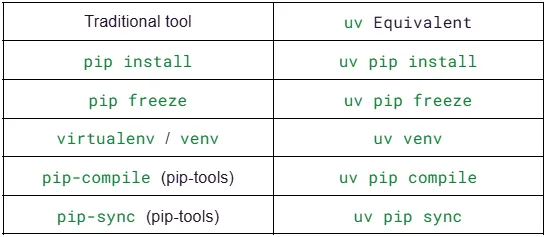
You don’t need to change your habits — just prefix pip commands with uv, and you’re good to go.
Single Standalone Binary
No need to install anything via pip or set up complex environments.
Just download the uv binary and run it — it works out of the box.
No runtime dependencies, and extremely easy to integrate into CI pipelines or container setups.
Built-in Virtual Environment Management
Create virtual environments with uv venv, a fast alternative to python -m venv or virtualenv.
Uses the standard .venv layout but does it faster and more cleanly.
Automatically detects and uses environments, simplifying project setup.
Lockfile and Reproducibility Support
uv pip compile generates lockfiles with hashes (compatible with pip install --require-hashes).
Great for ensuring reproducible builds in CI/CD pipelines.
Supports common patterns like splitting requirements.in and requirements.txt.
Performance
One of the standout qualities of uv — and perhaps its biggest selling point — is its blistering speed. From the moment you run your first uv pip install, the difference is undeniable.
Where traditional tools like pip can sometimes feel sluggish, especially on large projects or cold installs, uv blazes through installations, lockfile generation, and environment setups with remarkable efficiency.
This performance leap isn’t just accidental — it’s by design. uv is written entirely in Rust, a systems programming language known for its speed and safety. Rust allows uv to leverage low-level optimizations and efficient concurrency, which makes it possible to resolve dependencies, download packages, and install them all in parallel.
While pip often handles these steps sequentially, uv takes full advantage of multi-core CPUs to do more work in less time.
In real-world use cases, users have reported that uv can be 3 to 10 times faster than pip and tools like pip-tools or virtualenv.
Compiling a lockfile with hashes — a process that traditionally takes several seconds or even minutes in large monorepos — can be nearly instantaneous with uv. This makes a huge difference not just for developers working on dependency-heavy projects, but also for CI/CD pipelines where installation time can stack up quickly and cost teams both time and money.
The speed advantage also extends to virtual environment creation. Creating a new environment with uv venv is noticeably quicker than using Python’s built-in venv module or virtualenv.
This means faster onboarding for new team members, quicker test cycles, and more responsive development environments.
Even the more subtle features of uv benefit from this performance focus. Actions like listing installed packages (uv pip list) or freezing dependencies (uv pip freeze) are snappy and responsive, helping developers stay in flow rather than waiting on tooling.
In short, uv isn’t just faster in benchmarks — it feels faster in everyday usage. It removes the friction of waiting, whether you’re bootstrapping a fresh project or syncing hundreds of dependencies in a production-grade system.
And the best part? You get all this speed without sacrificing compatibility or functionality. With uv, you no longer have to choose between performance and reliability — you get both, out of the box.
Compatibility
One of the best things about uv is how effortlessly it fits into your existing Python workflow. Whether you’re coming from pip, virtualenv, pip-tools, or a combination of tools, uv acts as a near drop-in replacement — no rewiring required.
It supports Python 3.8 and above, works across macOS, Linux, and Windows, and plays nicely with familiar file formats like requirements.txt and requirements.in.
Even if you’re using lockfiles or hash-based installs, uv has full support. You can switch over without rewriting your project’s setup, making it incredibly easy to adopt incrementally or all at once.
Ideal For
uv is a perfect fit for developers and teams who want speed without sacrificing simplicity. It shines in fast-moving projects, large monorepos, and continuous integration environments where every second counts.
Whether you’re building production APIs, experimenting with data science notebooks, or maintaining open-source libraries, uv streamlines your setup and package management. It’s also great for beginners who want a no-fuss experience and for seasoned developers tired of waiting on slow installs and clunky environments.
Understanding it practically
Short description: Let’s test uv by creating a virtual environment installing numpy and running that file. We would also make a requirements.txt file and also use it in another directory to install numpy.
Assumption: I assume that you have already installed uv in your system.
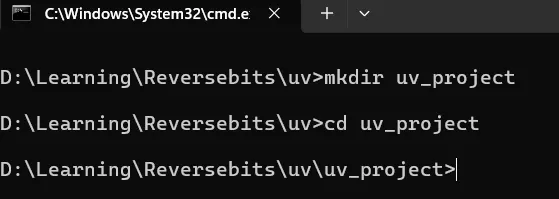
First, we create a directory called uv_project and enter in it.
mkdir uv_project
cd uv_project
Now create a virtual environment and install NumPy
Assumption: on Windows
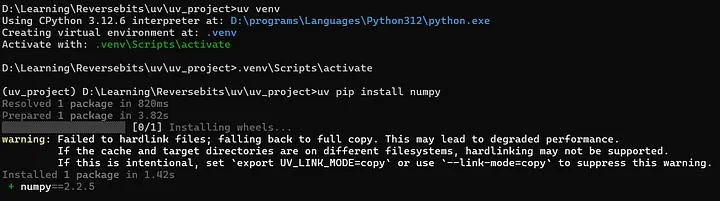
uv venv
.venv/scripts/activate
Note: it gives our venv a default name of .venv because it gets ignored by .gitignore
uv pip install numpy
About the warning
The warning that is shown will not affect your project.
What it means is when uv installs packages, it tries to hardlink files from its cache instead of copying them. Hardlinking is a way for two files to point to the same data on disk, which:
- Saves disk space
- Speeds up installations
However, hardlinking only works when the cache and your project’s environment are on the same filesystem (i.e., the same disk/partition).
If they’re on different filesystems, hardlinking isn’t allowed by the OS. So uv falls back to copying the files instead, and it shows this warning.
If you want to suppress the warning just use:
uv pip install --link-mode=copy
Running a simple Python file
Now NumPy has been successfully installed so let’s create a simple python file and run it:
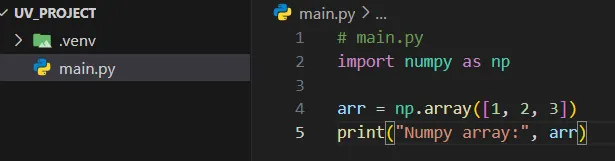

You see it works!
Note: you can also run it using:
uv run main.py
Creating a requirements.txt file
Just run:
uv pip freeze > requirements.txt
Using this in another folder might make this requirements.txt useful so lets do that:
Create another folder name cloned_project where we created uv_project and repeat the steps of creating virtual environment.
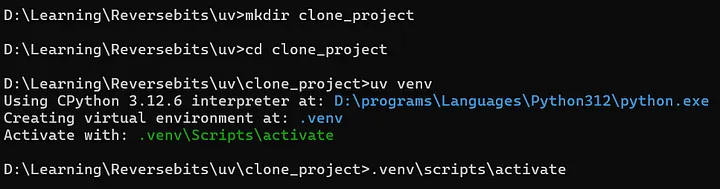
Now copy the requirements.txt file to this location.

Simply install requirements.txt:

You have a separate project with the same dependencies!
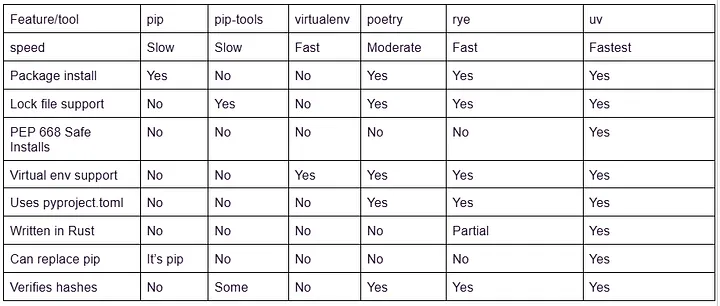
Comparison
Conclusion
In a landscape full of clunky, slow, and fragmented Python tooling, uv feels like a breath of fresh air — and honestly, a glimpse into the future.
It combines the speed and reliability of Rust with the ergonomics Python developers have been craving for years. Instead of juggling multiple tools for environments, installs, and lockfiles, uv gives you one fast, unified solution that just works.
It’s not only a productivity booster, but also a simplifier.
Whether you’re managing a personal project or an enterprise-scale codebase, uv is hands-down the most efficient and enjoyable way to manage Python environments today. It’s hard to go back once you’ve felt how smooth and fast Python development should be.
Related Topics
Enjoyed this article?
Check out more blogs on our blog.